Registration Checklist & CI/CD Plan
Purpose: step-by-step accounts to create, where each component lands, what it costs, and how CI deploys each one on change. Prerequisites: GitHub repo access, a payment card (Fly requires one even on free usage), the domain
findmyflowers.pl.
Related documents:
- DEPLOYMENT-SPEC.md — higher-level architecture rationale
- Diagrams: topology · purchase flow · IoT flow · network/DNS

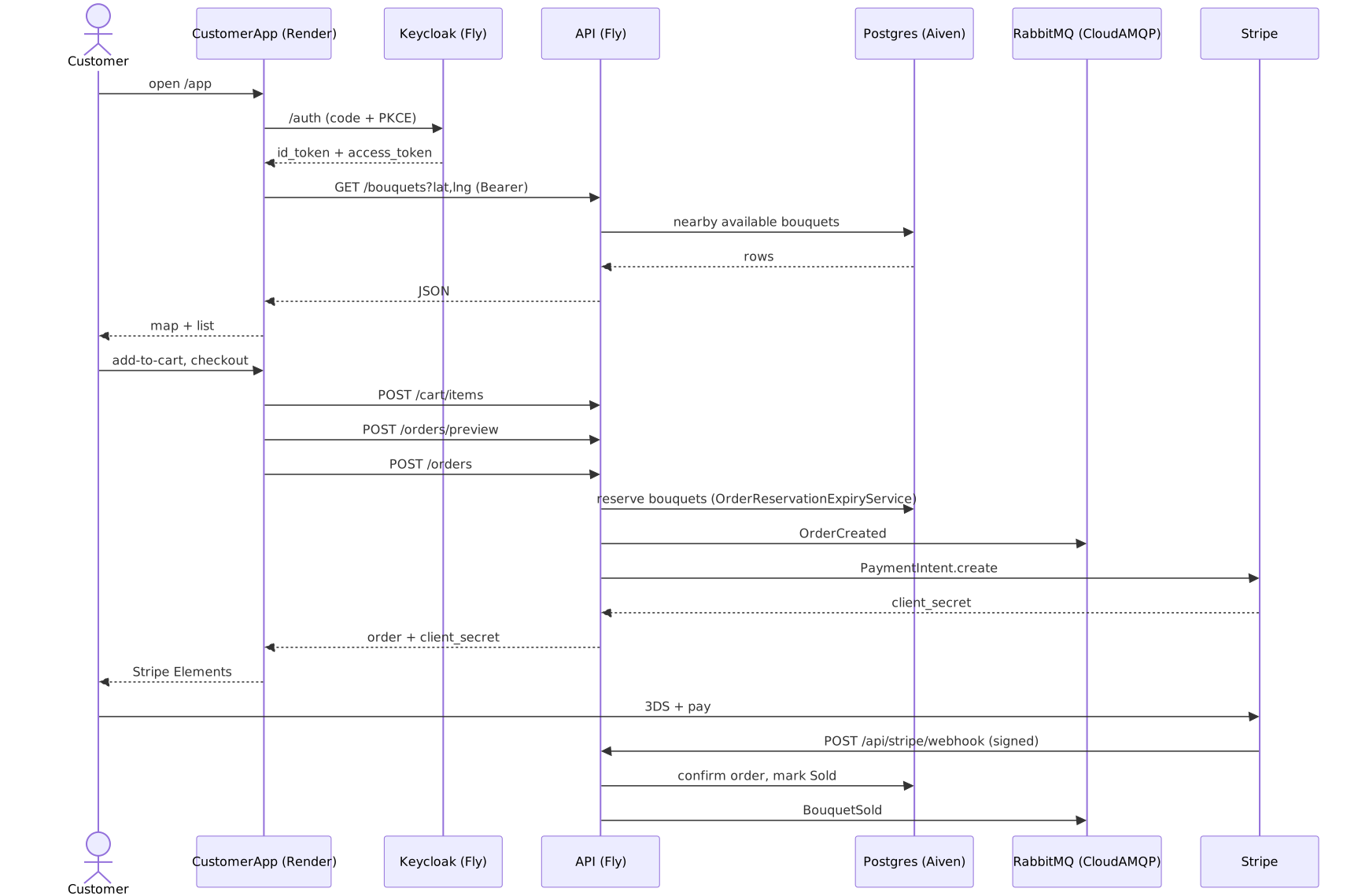
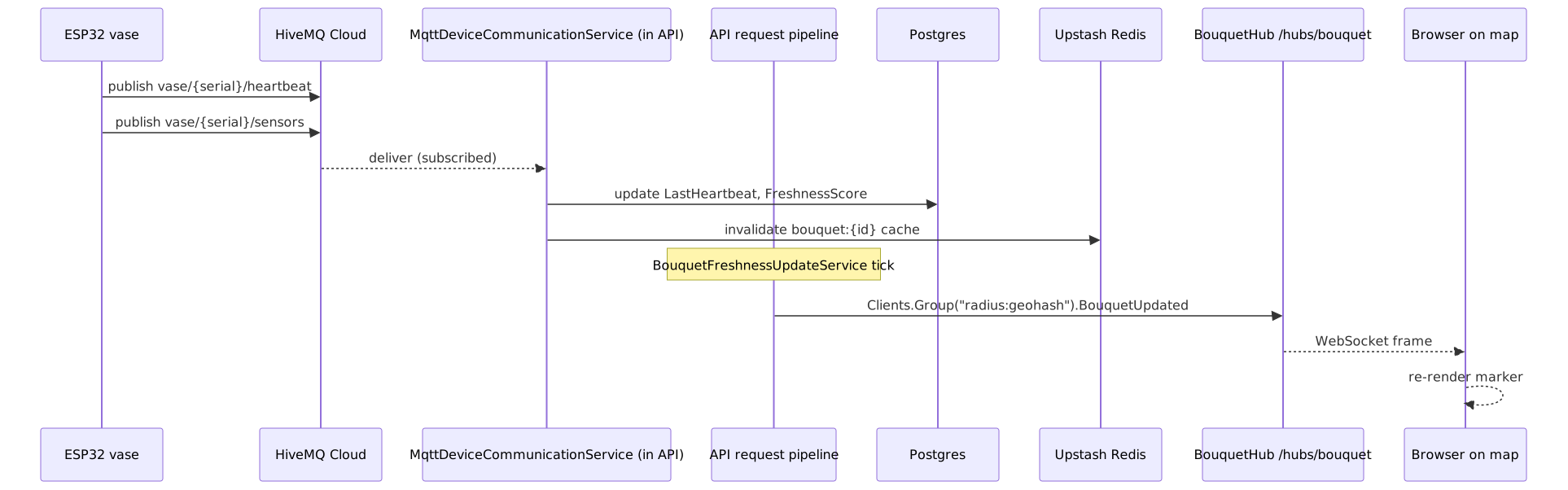

1. Component → Host → Price Matrix
| # | Component | Public URL | Host | Plan / Machine | What you register |
|---|---|---|---|---|---|
| 1 | FlowerShop.API (.NET 8, REST + SignalR + MQTT client + 5 hosted services + Stripe webhook) |
https://api.findmyflowers.pl |
Fly.io | shared-cpu-1x 1 GB, always-on, region fra |
Fly.io Hobby account + app flower-shop-backend-core (config fly.toml) |
| 2 | Keycloak 23 (OIDC + admin API) | https://auth.findmyflowers.pl |
Fly.io | shared-cpu-1x 1 GB, always-on, region fra |
Fly.io app flowershop-keycloak |
| 3 | FlowerShop.CustomerApp (MVC + OIDC) |
https://app.findmyflowers.pl |
Fly.io | min_machines_running=1, region fra |
Fly.io app flowershop-customer-app |
| 4 | FlowerShop.AdminPortal (Razor) |
https://admin.findmyflowers.pl |
Fly.io | min_machines_running=1, region fra |
Fly.io app flowershop-admin-portal |
| 5 | FlowerShop.VendorPortal (Razor) |
https://vendors.findmyflowers.pl (plural) |
Fly.io | min_machines_running=1, region fra |
Fly.io app flowershop-vendor-portal |
| 6 | PostgreSQL (DBs: flower_shop_backend_core, keycloak) |
internal — flower-shop-postgres.flycast |
Fly.io Postgres | PostgreSQL 17, region fra |
Fly Postgres app flower-shop-postgres |
| 7 | Redis cache | (not provisioned in prod) | — | dev-only in docker-compose.dev.yml |
— |
| 8 | RabbitMQ (event bus) | (not provisioned in prod) | — | dev-only in docker-compose.dev.yml |
— |
| 9 | MQTT broker | <cluster>.hivemq.cloud:8883 |
HiveMQ Cloud | Serverless free, 100 conn, 10 GB/mo, TLS | HiveMQ Cloud account + cluster |
| 10 | Bouquet photo storage | https://img.findmyflowers.pl |
Cloudflare R2 | 10 GB free, zero egress | Cloudflare account + R2 bucket flowershop-bouquets |
| 11 | Domain findmyflowers.pl |
DNS zone | OVHcloud (registrar) + Cloudflare (DNS) | .pl registration | OVHcloud account + domain; Cloudflare zone |
| 12 | Docs site docs.findmyflowers.pl |
Jekyll → gh-pages | GitHub Pages | Free | docs.yml workflow + docs/CNAME |
All five Fly apps run min_machines_running=1, so there is no keep-warm cron — Fly keeps them awake.
2. Registration order (30–45 minutes end to end)
Do them in this order — each step gives you a credential the next step needs.
2.1 GitHub (you already have this)
Confirm the repo is pushed. Enable Actions in Settings → Actions → General → “Allow all actions”.
2.2 Cloudflare (account + DNS)
- Sign up at https://dash.cloudflare.com.
- Add site
findmyflowers.pl(even before you’ve bought it — Cloudflare will give you two nameservers). - Noted for later: you’ll paste these NS at OVH.
- While here: create API token (scoped to Zone → DNS → Edit) for the GHA workflow that sets DNS records. Store as
CLOUDFLARE_API_TOKEN. - (Later, after R2 is needed) Enable R2, create bucket
flowershop-bouquets, connect the custom domainimg.findmyflowers.pl.
2.3 Domain — OVHcloud
- Sign up at https://www.ovhcloud.com/en/domains/.
- Register
findmyflowers.pl(~10 PLN first year). - In the OVH control panel, change nameservers to the two Cloudflare ones from step 2.2.
- Propagation: 15 min – 2 h.
2.4 PostgreSQL — Fly Postgres
fly postgres create --name flower-shop-postgres --region fra(PostgreSQL 17).- Once running, create the second database:
fly postgres connect -a flower-shop-postgres
# in psql:
CREATE DATABASE keycloak;   -- the app DB flower_shop_backend_core already exists
\q
fly postgres attach flower-shop-postgres -a flower-shop-backend-coresetsDATABASE_URLon the API.- Both DBs (
flower_shop_backend_core,keycloak) live on this one cluster, reachable in-cluster atflower-shop-postgres.flycast:5432.
2.5 Redis / RabbitMQ — not provisioned in prod
Redis and RabbitMQ only run in docker-compose.dev.yml. In prod the code falls back to in-memory
cache (RedisCacheService → AddDistributedMemoryCache()) and InMemoryEventBus. Nothing to register.
2.7 HiveMQ Cloud (MQTT)
- Sign up at https://www.hivemq.com/mqtt-cloud-broker/.
- Create Serverless cluster, region EU.
- Cluster name:
flowershop-mqtt. - In Access Management, create a credential for the backend (
flowershop-backend) and one per vase (or one shared for demo). - Copy cluster URL (e.g.
xxx.s1.eu.hivemq.cloud), port8883(TLS). Replaces dev-only Mosquitto.
2.8 Fly.io
- Sign up at https://fly.io. Add a payment card. Free usage stays inside the $5/mo Hobby credit.
- Install
flyctllocally: https://fly.io/docs/flyctl/install/. fly auth login.- Generate a deploy token:
fly tokens create deploy -x 999999h→ store as GitHub secretFLY_API_TOKEN. - Create the five Fly apps (
flower-shop-backend-core,flowershop-keycloak,flowershop-customer-app,flowershop-admin-portal,flowershop-vendor-portal), then let the GHA workflows deploy on push.
2.9 (Portals also run on Fly — no separate provider)
All three Razor/MVC portals are Fly apps (see §2.8). There is no Render account anywhere.
2.10 Keep-warm
Not needed — every Fly app runs min_machines_running=1, so nothing sleeps.
2.11 GitHub secrets to set (one place)
Go to Settings → Secrets and variables → Actions and set:
| Secret | Source | Used by |
|---|---|---|
FLY_API_TOKEN |
§2.8 | all 5 deploy-* workflows |
PG_PASSWORD |
Fly Postgres | db-backup.yml |
R2_ACCESS_KEY_ID, R2_SECRET_ACCESS_KEY, R2_ENDPOINT, R2_BACKUP_BUCKET |
Cloudflare R2 | db-backup.yml |
DOCS_DEPLOY_TOKEN |
PAT for the docs gh-pages repo | docs.yml |
CLOUDFLARE_API_TOKEN |
§2.2 | DNS workflow (optional) |
HIVEMQ_HOST, HIVEMQ_USER, HIVEMQ_PASS |
§2.7 | Fly secrets bootstrap |
KEYCLOAK_ADMIN_PASSWORD |
you pick | Keycloak workflow |
KEYCLOAK_CLIENT_SECRET |
after realm import | API + CustomerApp secrets |
STRIPE_SECRET_KEY, STRIPE_WEBHOOK_SECRET |
Stripe dashboard | API secrets |
3. Path-triggered CI/CD
GHA workflows live under .github/workflows/. Each is triggered by changes to the files that component compiles from, so a portal-only change doesn’t redeploy the API and vice-versa.
3.1 Path filters per component
There are 8 workflow files: 5 deploy workflows + db-backup.yml + docs.yml + one disabled ci-cd.yml.disabled.
| Workflow file | Triggers on push to main when these paths change |
|---|---|
deploy-api.yml |
src/backend/**, Dockerfile, fly.toml, .github/workflows/deploy-api.yml |
deploy-admin-portal.yml |
src/portals/FlowerShop.AdminPortal/**, .github/workflows/deploy-admin-portal.yml |
deploy-vendor-portal.yml |
src/portals/FlowerShop.VendorPortal/**, .github/workflows/deploy-vendor-portal.yml |
deploy-customer-app.yml |
src/portals/FlowerShop.CustomerApp/**, .github/workflows/deploy-customer-app.yml |
deploy-keycloak.yml |
docker/keycloak/** (realm export, Dockerfile), .github/workflows/deploy-keycloak.yml |
db-backup.yml |
scheduled (Mondays 03:17 UTC) + workflow_dispatch — pg_dump -F c of both DBs → R2 |
docs.yml |
docs/** — Jekyll build → gh-pages repo → docs.findmyflowers.pl |
Shared code in src/backend/FlowerShop.Domain, .Application, .Infrastructure sits under src/backend/** — any change there triggers only the API workflow (which is correct; portals don’t reference backend assemblies, they call the API over HTTP).
Each workflow also has workflow_dispatch: so you can trigger a manual redeploy from the Actions UI.
3.2 Workflow outputs / expected duration
| Workflow | Typical runtime | Deploy target |
|---|---|---|
deploy-api.yml |
~4–6 min | Fly.io app flower-shop-backend-core |
deploy-keycloak.yml |
~3 min | Fly.io app flowershop-keycloak |
deploy-customer-app.yml |
~3–4 min | Fly.io app flowershop-customer-app |
deploy-admin-portal.yml |
~2–3 min | Fly.io app flowershop-admin-portal |
deploy-vendor-portal.yml |
~2–3 min | Fly.io app flowershop-vendor-portal |
All five run flyctl deploy --config <app>.fly.toml (the API uses fly.toml).
4. First-time bootstrap sequence
Run once, then CI takes over.
4.1 Fly apps
# API — app flower-shop-backend-core, region fra (config fly.toml)
fly apps create flower-shop-backend-core
fly secrets set \
  MQTT__BrokerHost="$HIVEMQ_HOST" \
  MQTT__Username="$HIVEMQ_USER" \
  MQTT__Password="$HIVEMQ_PASS" \
  Authentication__UseKeycloak=true \
  Authentication__Keycloak__ClientSecret="$KEYCLOAK_CLIENT_SECRET" \
  Stripe__SecretKey="$STRIPE_SECRET_KEY" \
  Stripe__WebhookSecret="$STRIPE_WEBHOOK_SECRET" \
  FileStorage__R2__AccessKeyId="$R2_ACCESS_KEY_ID" \
  FileStorage__R2__SecretAccessKey="$R2_SECRET_ACCESS_KEY" \
  --app flower-shop-backend-core
# DB connection comes from `fly postgres attach` (§2.4). Redis/RabbitMQ are unset in prod.

fly certs add api.findmyflowers.pl --app flower-shop-backend-core
# Repeat pattern for keycloak, customer-app, admin-portal, vendor-portal (region fra) with the right secrets
Add DNS CNAMEs in Cloudflare: api, auth, admin, vendors, app → <app>.fly.dev (app → flowershop-customer-app.fly.dev).
4.2 Portal Fly apps
Each portal has a committed Fly config (fly.admin-portal.toml, fly.vendor-portal.toml, fly.customer-app.toml, all region fra, min_machines_running=1). Create the app, set the common env (ASPNETCORE_URLS, ASPNETCORE_FORWARDEDHEADERS_ENABLED, ApiSettings__BaseUrl=https://api.findmyflowers.pl, and for the portals Authentication__KeycloakBaseUrl=https://auth.findmyflowers.pl), add the custom domain via fly certs add, then let the matching deploy-*.yml workflow deploy on push. The portals authenticate through the flowershop-api client (password grant) — there is no dedicated portal OIDC client.
4.3 Keycloak realm bootstrap
- After first
deploy-keycloak.ymlrun,fly ssh console -a flowershop-keycloak. - The realm is committed at
docker/keycloak/flowershop-realm.jsonand mounted into/opt/keycloak/data/import; boot withstart --optimized --import-realm. - After import, read the
flowershop-apiclient secret from Credentials tab → set asKEYCLOAK_CLIENT_SECRETin GitHub secrets → re-run API + CustomerApp workflows to pick it up.
5. Workflow files — see .github/workflows/
deploy-api.ymldeploy-keycloak.ymldeploy-customer-app.ymldeploy-admin-portal.ymldeploy-vendor-portal.ymldb-backup.ymldocs.yml
Each deploy workflow:
- Checks out the repo
- Runs
flyctl deploy --config <app>.fly.toml(the API usesfly.toml) - Waits for health check
6. What to do today (go-live checklist)
- Register domain at OVH (§2.3)
- Create Cloudflare account + add zone (§2.2)
- Create Fly Postgres
flower-shop-postgres+keycloakDB (§2.4) - Create HiveMQ cluster (§2.7)
- Create Fly.io account, install flyctl, generate token (§2.8)
- Set all GitHub secrets (§2.11)
- Commit the workflow files +
fly.*.tomlconfigs - Create the 5 Fly apps + set secrets (§4.1–4.2)
- Push a change → watch path-filtered workflow deploy only the affected component
- Add Cloudflare records for all subdomains (
api,auth,admin,vendors,app) - Bootstrap Keycloak realm (§4.3)
- Smoke test: login via CustomerApp, list bouquets, place a test order with Stripe test key